Saturday, March 22, 2008

Getting Close... Off to Student Teach...

Well, I'm off to begin my student teaching, and the program is close, but not quite where I'd like it. Most of the code is in place, but there are still some bugs that I need to address when I come in here on Saturdays over the next two months.

Also, some of the data I've been using isn't as current as it should be. I'm looking for an updated dataset for Businesses and Places of Worship - all religions. If anyone knows where I might find such data, I'd love to know... otherwise I'll be doing some research and then some geocoding.

That said, again, I'm close, and this project has been a lot of fun - learning to use ArcObjects to do something custom like this is always a trip. I'll leave you with a map I was able to make with the program this afternoon:


Any feedback encouraged!

Have a great spring... I'll check in soon,

Mike

Saturday, March 8, 2008

Tech Update: Early March Progress

Well, things weren't so smooth in general this week. Had a death in the family and my profs at DePaul are trying to kill me with papers, but I still made some improvements to the interface when I found time.

The major improvement occurred behind the scenes. I created an .ini file that stores all global variables (directories, paths, layer names). This should make it easier if I create an install package - or really if I just move it to another machine. It was a pain when I demoed for David last week, having to go into the code to change string variables manually. This file will contain all variables that are machine-specific.

I also hooked up the list boxes. Previously, Community names were coming from a flat .txt file, and the list box that will allow Dan to manually choose TMC programs from a master list were not operational at all. These list boxes read from the attribute data of the associated .shp files now. A few problems appeared this afternoon, which I will address this week. First, it takes a while to read in all values from the .shp files, so I need to create a progress bar when the tool launches. Second, I'm playing with a chunk of code that will order the attribute table prior to reading the values (to alphabetize). Haven't had a lot of luck yet.

I think that's about it this week. Oh - I played with the IMS Server data, and found nice base map/streets layers. (After a review session with ARCGis and projecting coordinate systems. Thanks again, David!)

Saturday, March 1, 2008

ArcIMS Servers seem to rule

I spent this week working alongside an intern who came down from the University of Michigan to help Dan with a flash presentation... a quick thanks to her for playing DJ all week... heard some fantastic new music!

From a tech standpoint, I was able to make a lot of progress with the interface, hooking up the remaining layers. I took the program to Loyola yesterday to demo it for my good friend, David Goldblatt, a GIS guru with Loyola's Center For Urban and Environmental Policy group, and he gave me a ton of constructive feedback.

He then introduced me to the magic of ArcIMS servers.

In my ArcGIS training, I learned to surf the web and "steal" premade shapefiles (map layers) if I needed them. If a layer was unavailable (for instance, it's hard to find premade shapefiles for IL schools that are up to date), you have to find address data and run a process called "geocoding" whereby the software tries to match the address to its database of known streets. This is problematic for two reasons (off the top of my head). First, there are new streets and subdivisions built daily... so often the software's street data can't find a match. When this happens, you have to manually match the address to a nearby street that DOES exist in the database. This takes a lot of time. Especially if there are thousands of unmatched schools. And of course, it's inaccurate. Second, schools open and (too frequently around here) close. In the shapefile I have for instance, Al Raby High School is listed as Lucy Flower Vocational. Same building... new name... old data.

So periodically my search for geocodable address data ends up at a place like this school locator. Cool toy, but how do I get to the data behind the site? Until yesterday I thought I couldn't. Turns out, Arc Catalog allows you to link to some sites' data layers using "ArcIMS Servers"!

Why did no one tell me this before? :) Now I have access to all kinds of school data, crime data from the police, transportation data ... on and on. They warehouse the data... so they maintain and update the data too. What's more, their symbols are customized and professional-looking. This almost seems too good to be true, but for now, this is going to save my uncountable headaches (until I discover limitations!)

So that is my big discovery this week. Maybe you didn't know about this either. Maybe you have more ArcGIS tips to share with me.

And I should mention that my understanding of ArcObjects continues to improve. If anyone needs help/code, maybe I can be of assistance.

Have a great week!

Monday, February 25, 2008

Tech Update: Some Progress Over The Past Week

After a bit of a struggle, the program now lets users plot multiple custom addresses to a map. Each point can have a custom symbol, and there is a tool that allows the user to track and delete points that have been geocoded and added. (It turns out that adding and deleting individual geocoded points is a little tricky to do programmatically, but after hitting my head against the wall a few times over the week, several posts on the ESRI developer board, and a bit of good luck, the system now works.) I've also added functionality that allows users to turn labels on or off for each layer included, and at this point, I'm adding the rest of the layers. I may have to create a few shapefiles myself, as some of the data here seems a little dated (CPS schools, for instance). After these layers are in place, I want polish up the zoom functionality. Still hoping to have something usable by the time I begin student teaching in late March.

Saturday, February 16, 2008

Tech Update: Rolling Up My Sleeves

Ok... this week has been full-on trouble shooting and learning how to make the code behind the software's engine do what I need it to do. I have programmed with Visual Basic in the past, so I'm comfortable with the VBA editor that comes with ArcGIS. On the other hand, the object model for ArcGIS is humongous! I've had success in the past using the object model, but it's always an adventure, and my success is owed entirely to the many support/help resources I've found. The fact is that many people have published their code online, so I haven't had to invent many wheels so far.

I'd like to take a second and share my sources, in case anyone out there is interested in coding ArcObjects but just starting out. And of course, any of you veterans who know of more/better sources, please send em my way.


First, I should mention that I do use my trusty copy of Getting To Know ArcObjects by Robert Burke a lot. But not nearly as much as online sources such as ArcObjects Online and The ESRI Developer Network, each of which offer a lot of documentation and code samples. But the ESRI User Forums is the goldmine. Usually my first stop - highly recommended and helpful.

So, what have I accomplished so far (with the help of these resources)? For starters, I have learned how to zoom to the boundary of a polygon, such as a neighborhood or a the boundary of zip code. The volunteers here might want to make a map of the Albany Park neighborhood. They can do this now with the click of a mouse, thanks to code which came largely from the Burke book.

I have also learned how to programatically geocode a custom address (although I have had problems refreshing the geocoded point to appear on the layout once it is added to its attribute table. Still unsolved but I'm not out of ideas.)

In fact, refreshing the map layout is more complicated - in general - than I had anticipated. A guy in India on the ESRI boards helped me troubleshoot my code when I was having a hard time accessing and refreshing the legend. (Thanks, Vijay!) Maybe this technique will shine light on why my geocoded point won't refresh. I'll get that fixed this coming week.

What else did I build this past week? There is now a way for the user to customize the title, add news text, and add credits/sources to the map. Again, this was a little more difficult than I suspected it would be, since the text objects' property dialogs do not let you give them unique IDs/Names... and you need to refer to the objects by name when accessing them programatically. No idea why you can't simply rename them in their property boxes. Turns out, I had to create a custom routine to name the components, one at a time, at the moment I created them. Strange, but it worked. (Drop me a line if anyone needs any of this code.) Moreover, I had to add code to add carriage returns to user text (news stories), in order to ensure the textbox object stays at the proper width in the layout. (If that makes sense.)

I have also learned how to access layers in the Table of Contents (toc), and how to toggle them on and off. Again, refreshing the toc is separate from refreshing the map... and then refreshing the legend - all of which have to occur when a layer is toggled on or off. But now that I can do all of this, adding the layers Dan needs (hospitals, schools, teacher/mentor program locations, etc.), and attaching them to the interface will be tedious but straight-forward.

Lastly, I should mention that a guy who lurks on our yahoo group TutorMentor_GIS_Project works for the city of Chicago, and contacted me with a donation of code that allows me to export map layouts to .pdf ... thanks!

That should get us up to date for the week. Here's a quick look at the interface in its current state:
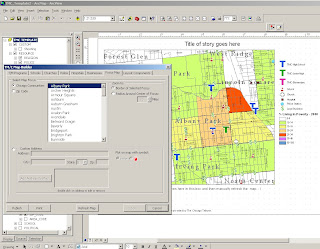

See you next week.

Thoughts and prayers to everyone who lost their home in this week's fire at Cabrini Green. Heartbreaking story.

Saturday, February 9, 2008

Cabrini Connections artists present their work in a gallery this weekend!

Oh while I have you today.... If you're on the Near North Side this weekend, and want to check out some of the amazing artwork the kids here at Cabrini Connections made, the pieces will be displayed until the end of this weekend at Pallette and Chisel on 1012 N. Dearborn (Don't think about buying any of it though - it all sold already!) Some news on the event here. And here.

I think you'll be amazed. Some of what I've seen is stunning.

And if you can't make it but want to see a few pieces online (and read a few artist bios), there is some of that at the Cabrini Connections website.

Also, a few of the kids (mentioned in an earlier post) spent years working on a documentary called Cabrini Green:Times of Change, detailing the gentrification of their Cabrini neighborhood. The film was premiered yesterday, and will be for sale beginning next week. Buy a copy to support these fine artists, and to learn a little more about the history of Cabrini Green. ($20 each, which includes mailing/$10 if you pick up copies at Cabrini Connections). Just email tutormentor2@earthlink.net.

I'm heading over to the gallery right now to give everything one last look.

Catch ya later.